> For the complete documentation index, see [llms.txt](https://docs.withluna.ai/llms.txt). Markdown versions of documentation pages are available by appending `.md` to page URLs; this page is available as [Markdown](https://docs.withluna.ai/launches/subscribe-and-get-notified.md).
# Subscribe and get notified
## Subscribe to launches and milestones
This feature allows participants **AND** **non-participants** to receive notifications - via the app, Slack, or email - about launches or milestones they want to track:
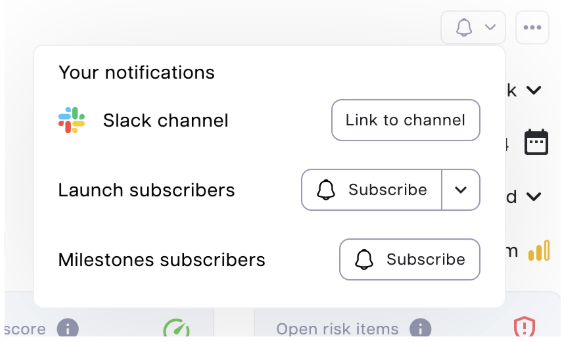
1. Click the **bell icon** at the top right of Launch Details Page
2. Choose from three notification options:
### Option 1: Slack notifications
* Receive notifications when key launch parameters change
* Setup process:
1. Authorize permission to access the Luna Slack workspace
2. Choose the Slack channel to receive notifications
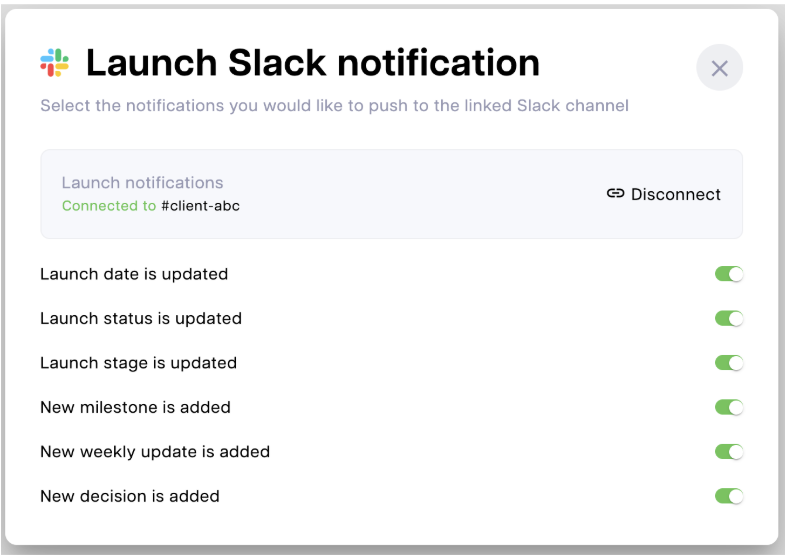
3. Select which notifications to receive:
* Launch date is updated
* Launch status is updated
* Launch stage is updated
* New milestone is added
* New weekly update is added
* New decision is added
### Option 2: launch subscription
* Subscribe or unsubscribe yourself or others to launch-level notifications
* Example notifications:
* Launch status is changed to "At risk"
* Launch date becomes outdated
* Notification types and channels (in-app, Slack, email) can be modified in **Settings > Notifications**
### Option 3: milestone subscription
1. Subscribe yourself or others to specific milestones
2. Example notifications:
3. Milestone target date becomes outdated
4. Milestone target date is due soon
5. Notification types and channels (in-app, Slack, email) can be modified in **Settings > Notifications**
## Manage subscriptions
Access **Settings > Notifications** to:
* View and manage all your launch and milestone subscriptions
* Configure notification channels and preferences